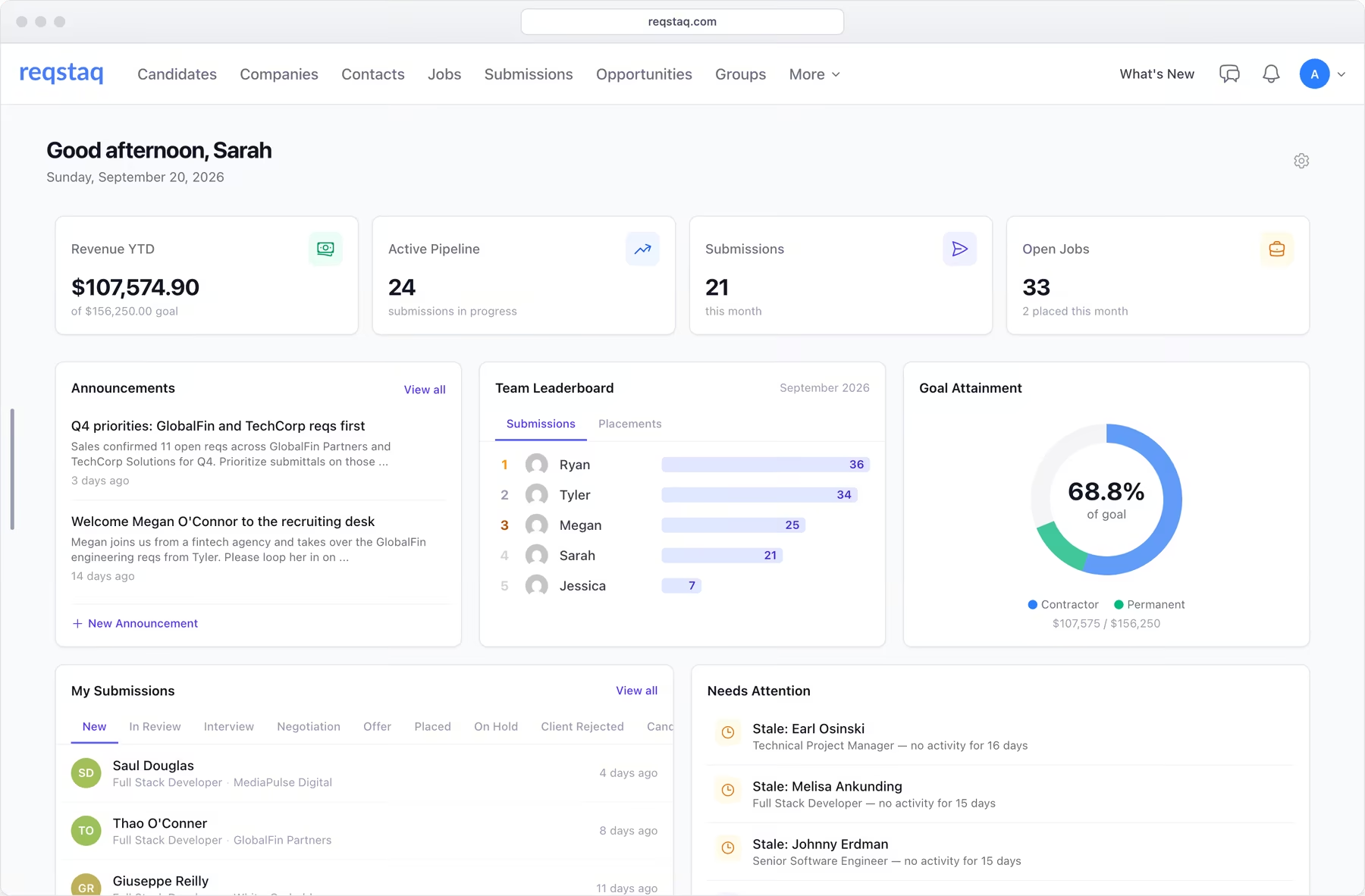

Everything you need to run your desk.
One record per candidate, one per job, one per client. Your team works out of them from the first call to the placement.
Search the whole database with boolean and column filters, flip through a shortlist in Quick View, and see every email, note and submission on one profile.
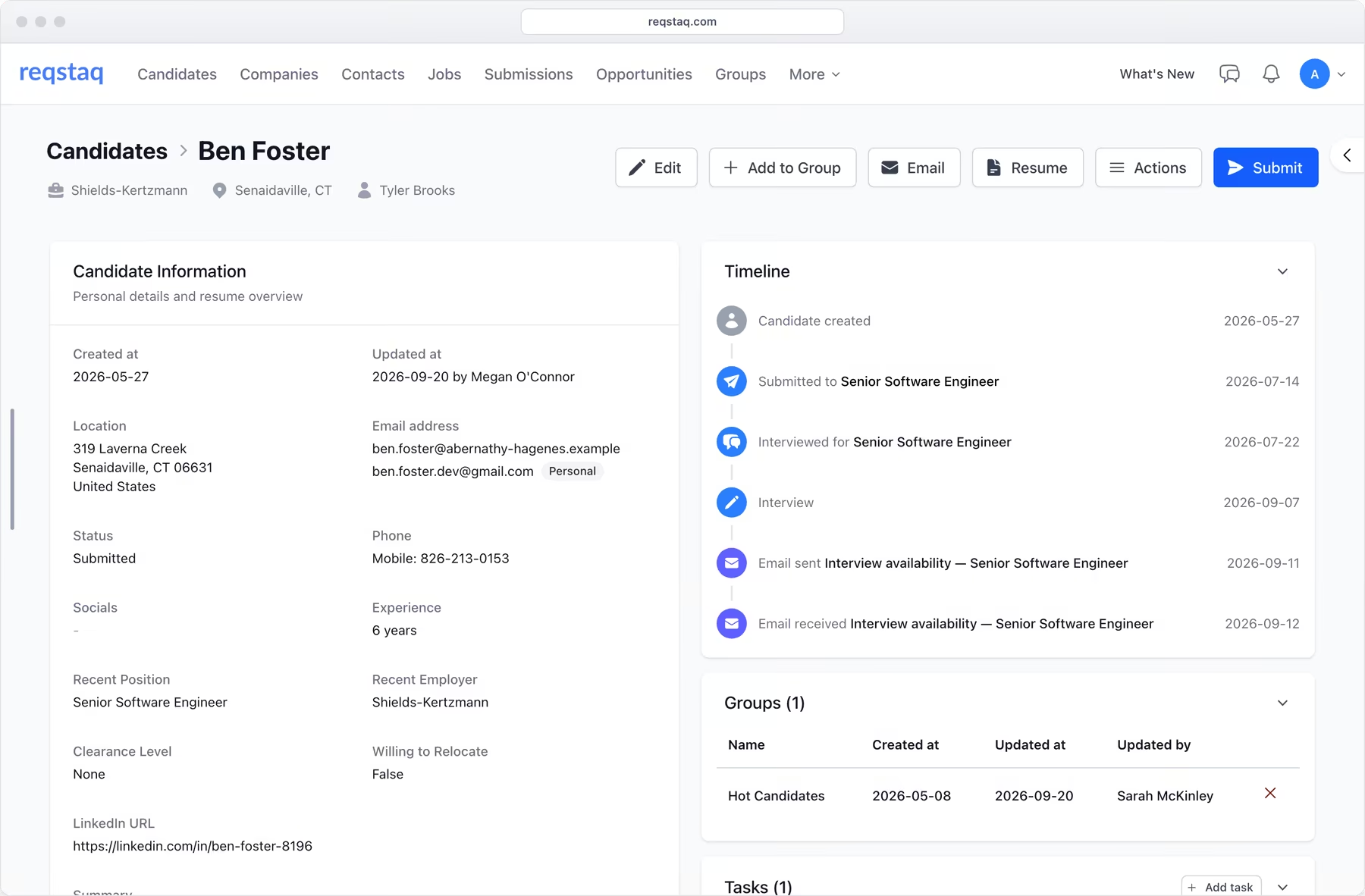
Move candidates through your stages, send the resume to the client straight from the record, and see who is stuck before the client asks.
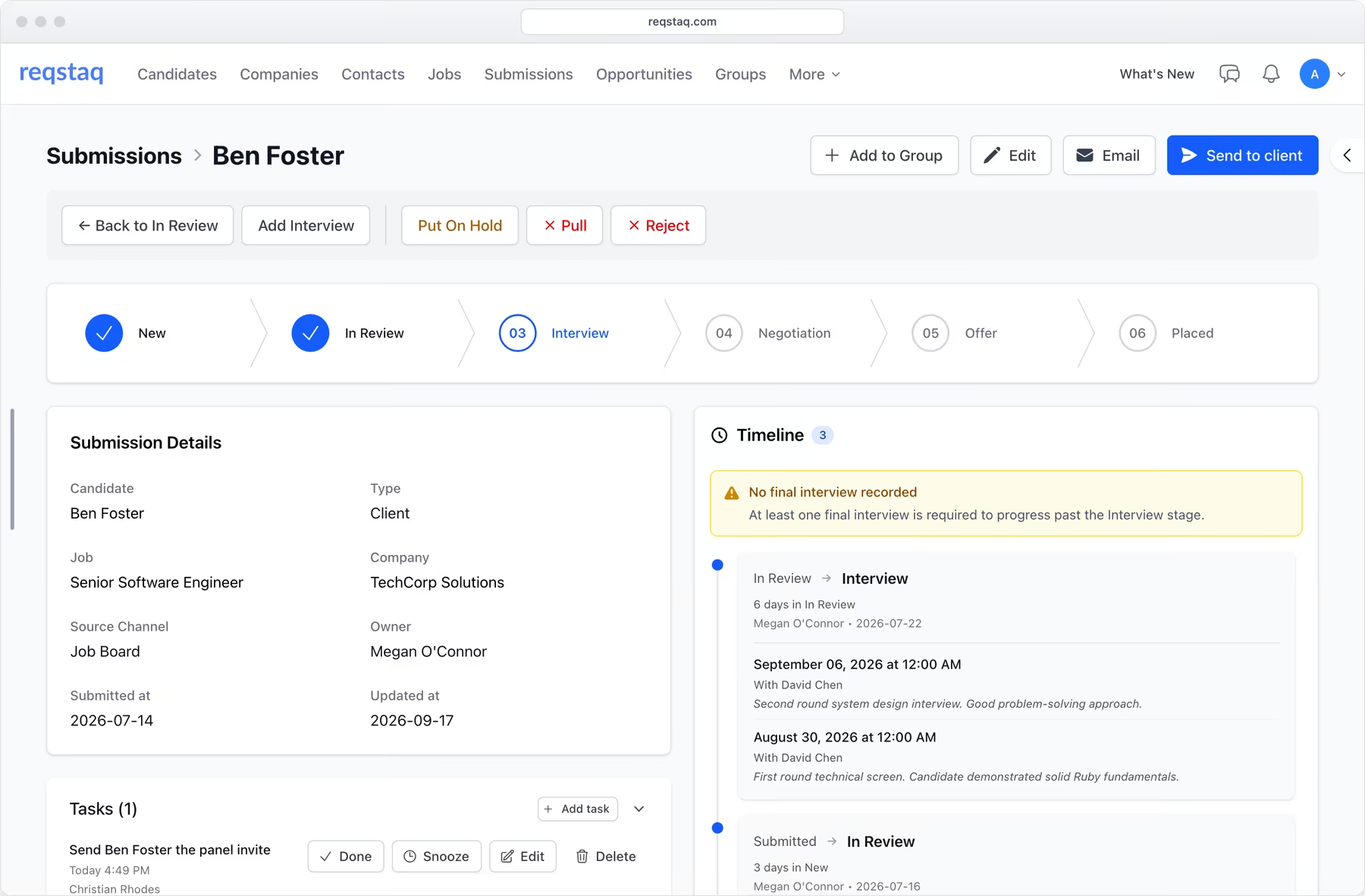
Every contractor and direct hire with start dates, bill and pay rates, gross margin and portal status, month by month.
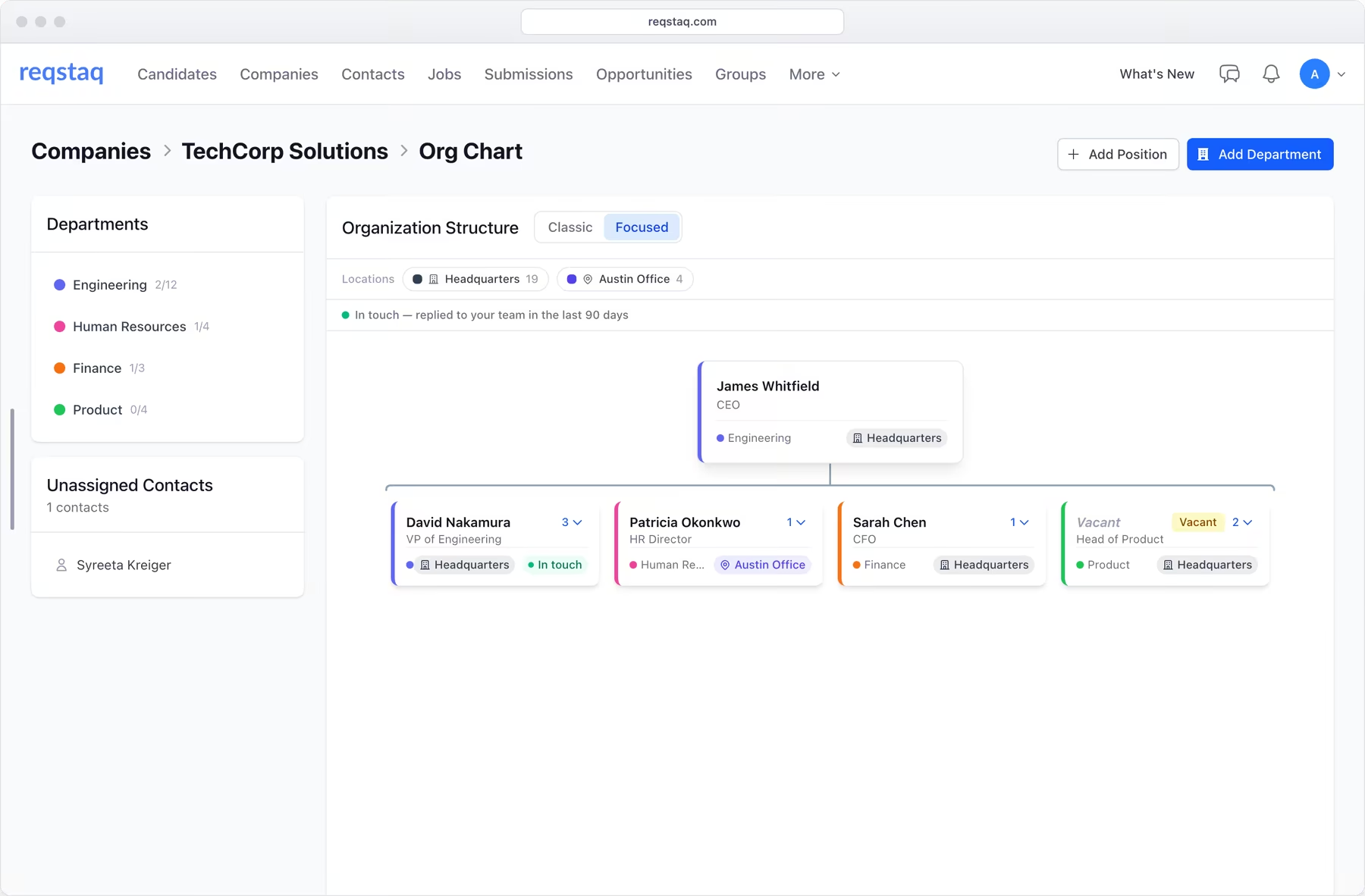
Companies, contacts and opportunities in one place. Convert a won opportunity into a job order, and see on the org chart who you have been in touch with.
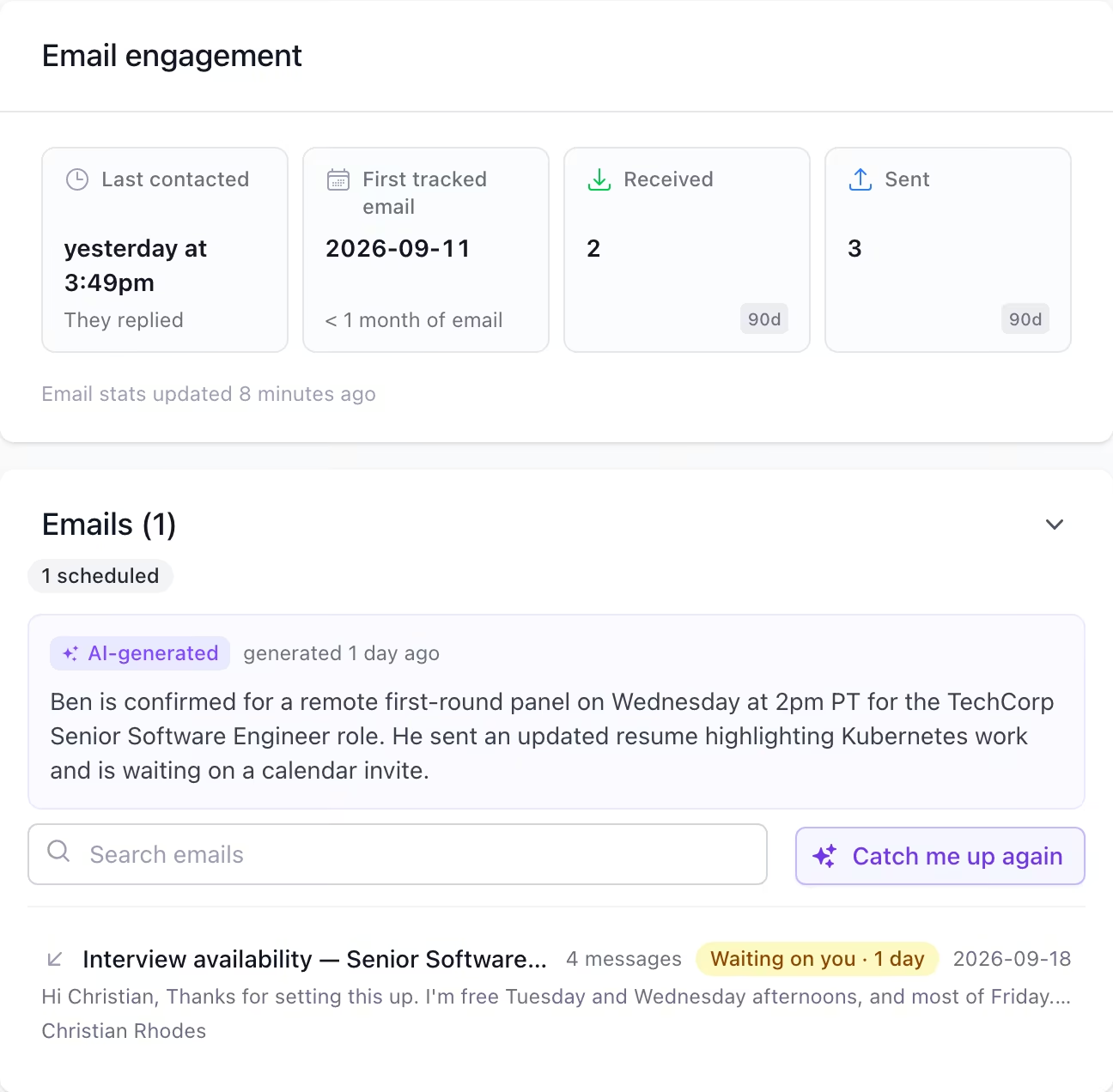
Every email with a candidate or client, on their record.
Your IT admin adds one rule to Google Workspace or Microsoft 365. From then on, mail between your team and anyone in your database lands on the right profile. No BCC address, nothing to install.
-
From your own mailbox
Emails leave through your Google or Microsoft account. They sit in your Sent folder and replies come back to your inbox.
-
Templates and follow-ups
Merge fields fill in from the record. Schedule for Monday at 8. If nobody replies in three days, send the follow-up or get a reminder.
-
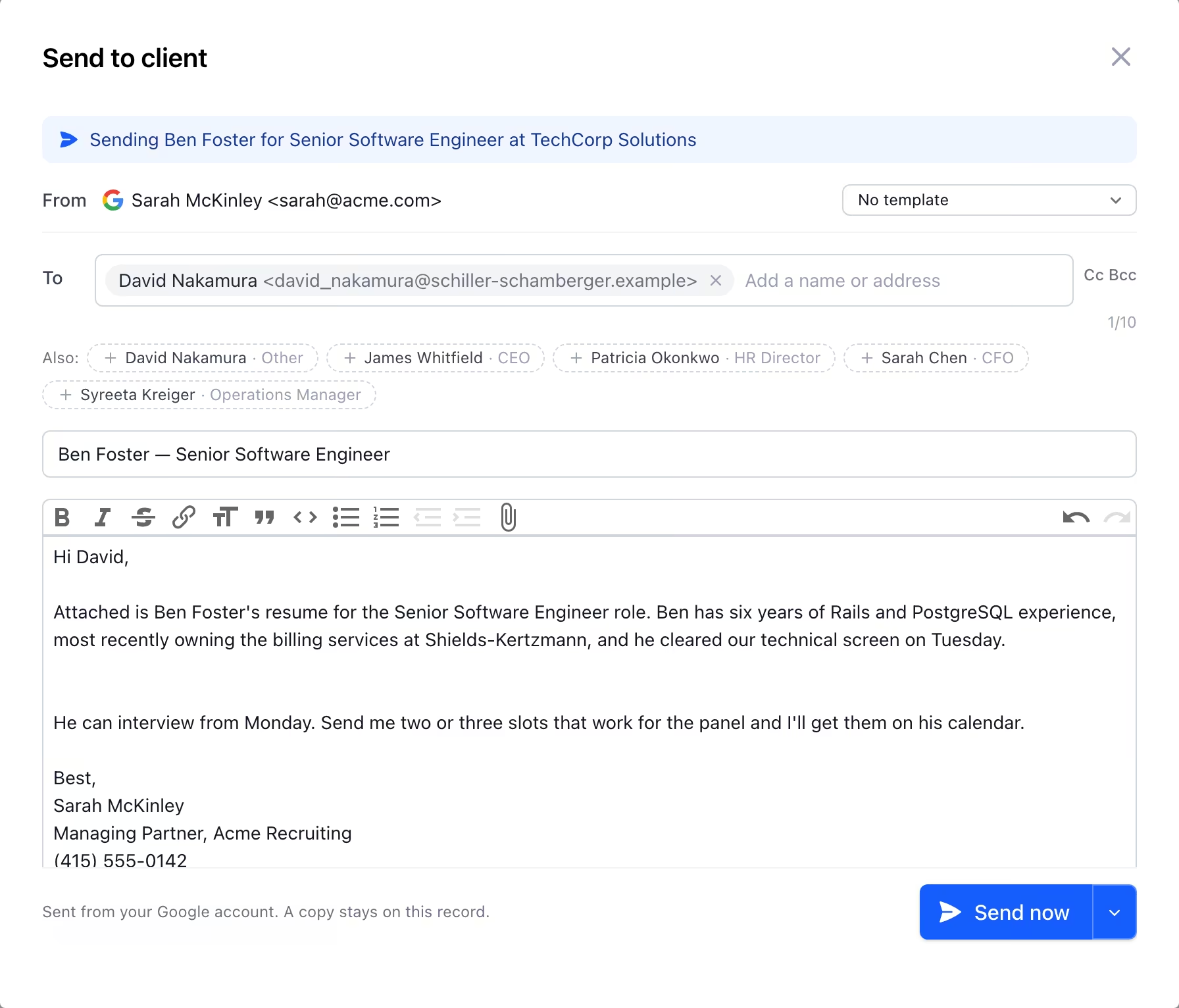
Send to client
Submit a candidate from the submission itself. The resume is attached and the status moves the moment the client's mail server accepts it.
-
Campaigns, one at a time
Email a group from your own address, one personalised message per person, with an unsubscribe footer. Replies land on the record.
Needs reply and awaiting reply, in one queue. Watch words flag the phrases you care about, like “no longer with the company”.
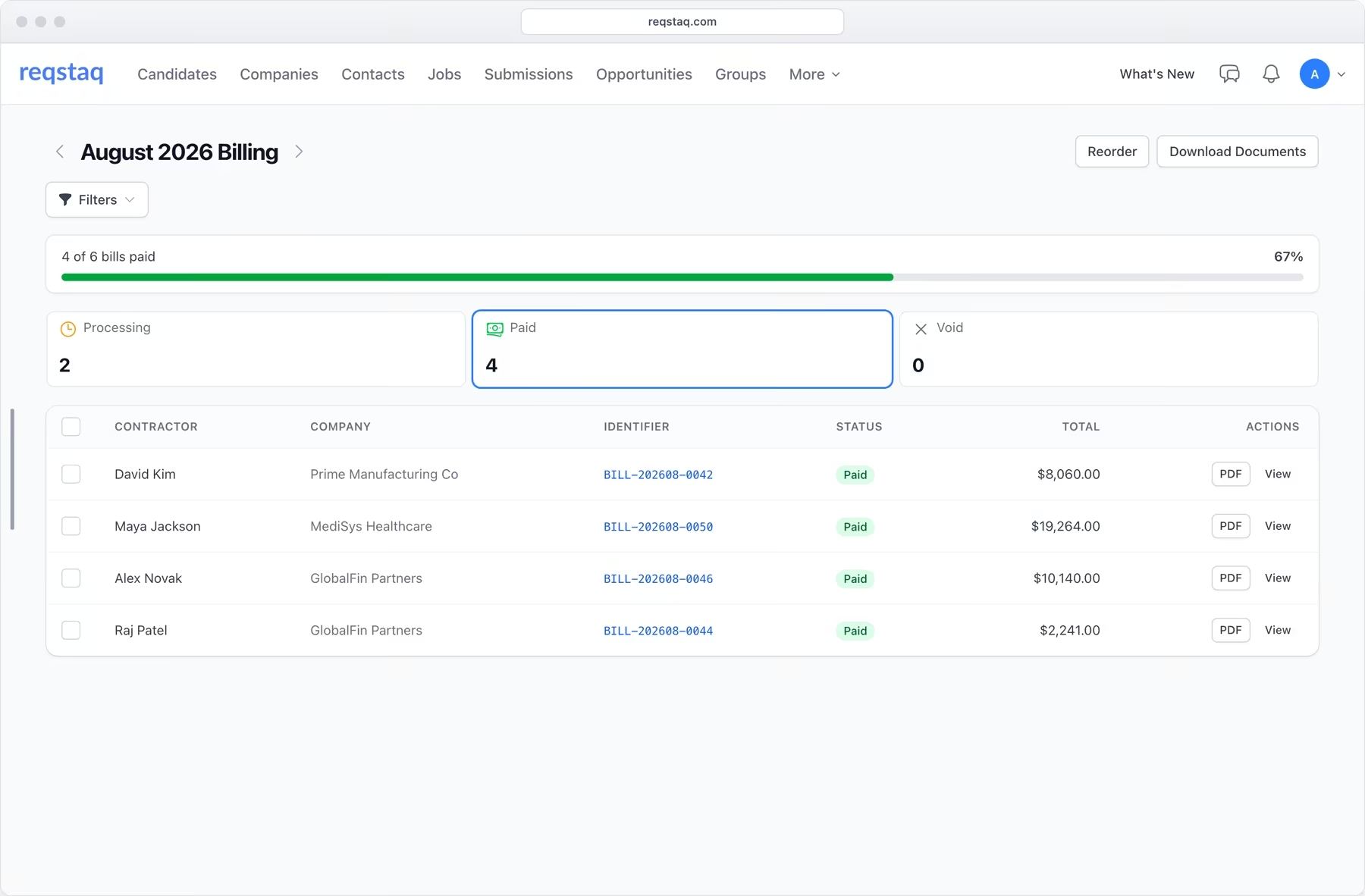
Timesheets and billing in both directions, without the spreadsheet.
The hours a contractor reports flow into the bill they send you and the invoice you send your client. Nothing is re-keyed.
-
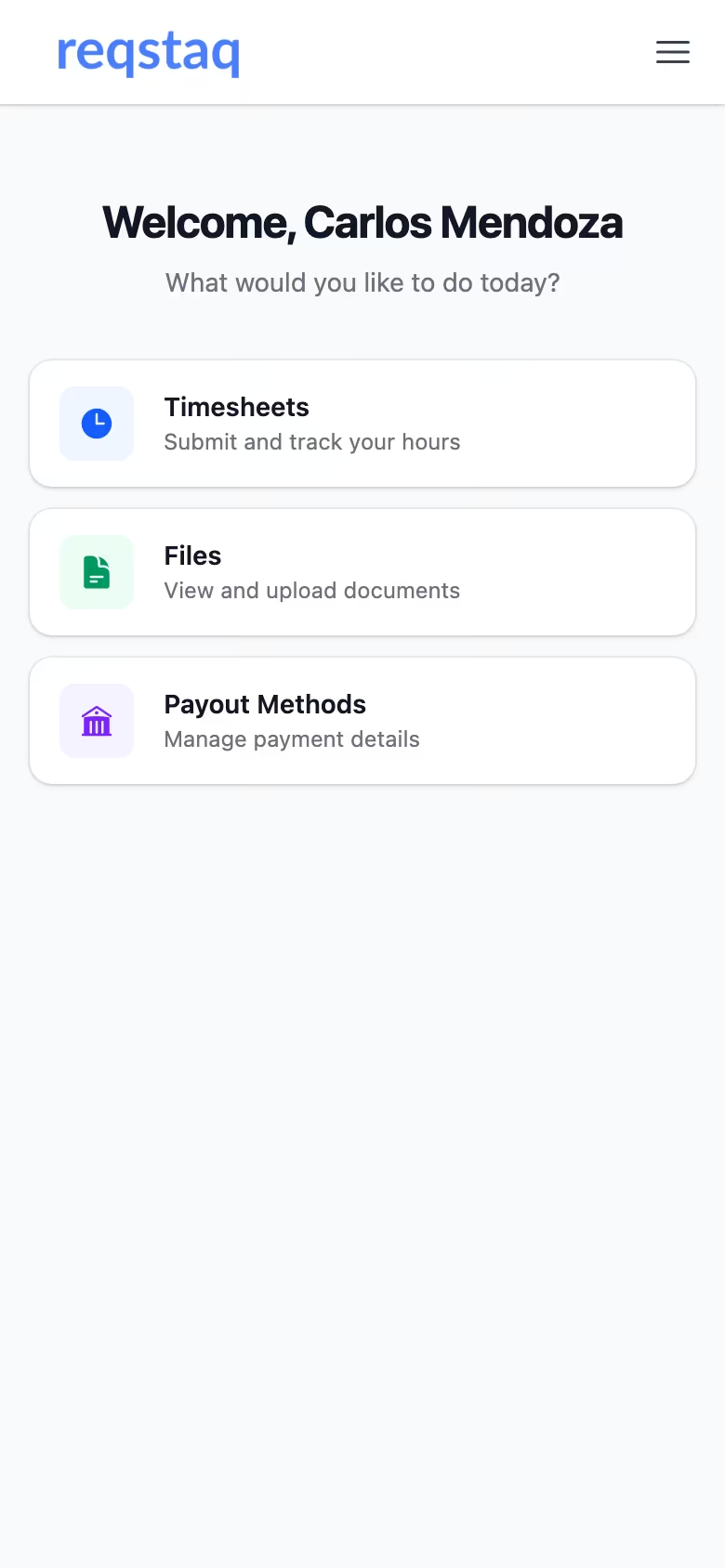
Contractors submit hours in the portal
A monthly timesheet on any phone, with reminders on the schedule you set. Contractors also see their pay statements, files and messages there, at no seat charge.
-
Contractors bill you, and you review
Each month's hours become the contractor's bill to your firm, with their payout details on it. Adjust hours with a reason, request changes, or approve and pay. Paying locks the timesheet.
-
You bill the client
Pick the client and the month. The same hours come through at bill rate, one line per rate period, as an invoice you can download and mark sent and paid.
Rates that change mid-month, offboarding with a last working day, and one-click rollover into the next month.

Stop running your firm across five tools
ATS, email, timesheets, invoices and reports — Reqstaq brings your candidates, clients, jobs and revenue into one login.
AI that does recruiter work.
No chatbot. Reqstaq uses AI where it saves an hour: matching, search strings, screening questions and catching up on a thread.
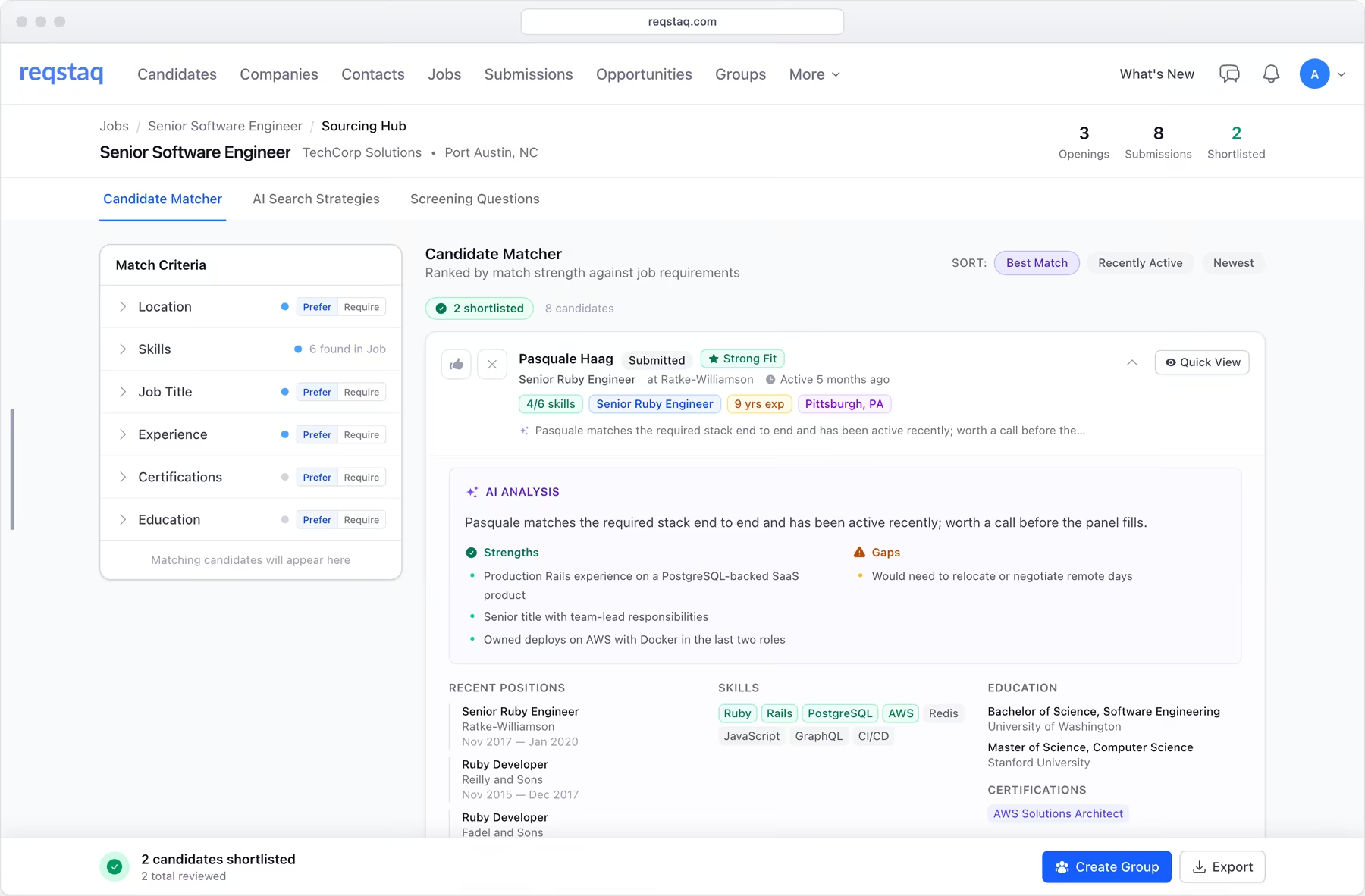
Candidate Matcher
Fill the job from the database you already own.
Open the Sourcing Hub on any job for a ranked list of your own candidates by skills, title, experience and distance. Mark criteria required or preferred, read a fit analysis on each, and shortlist to a group.
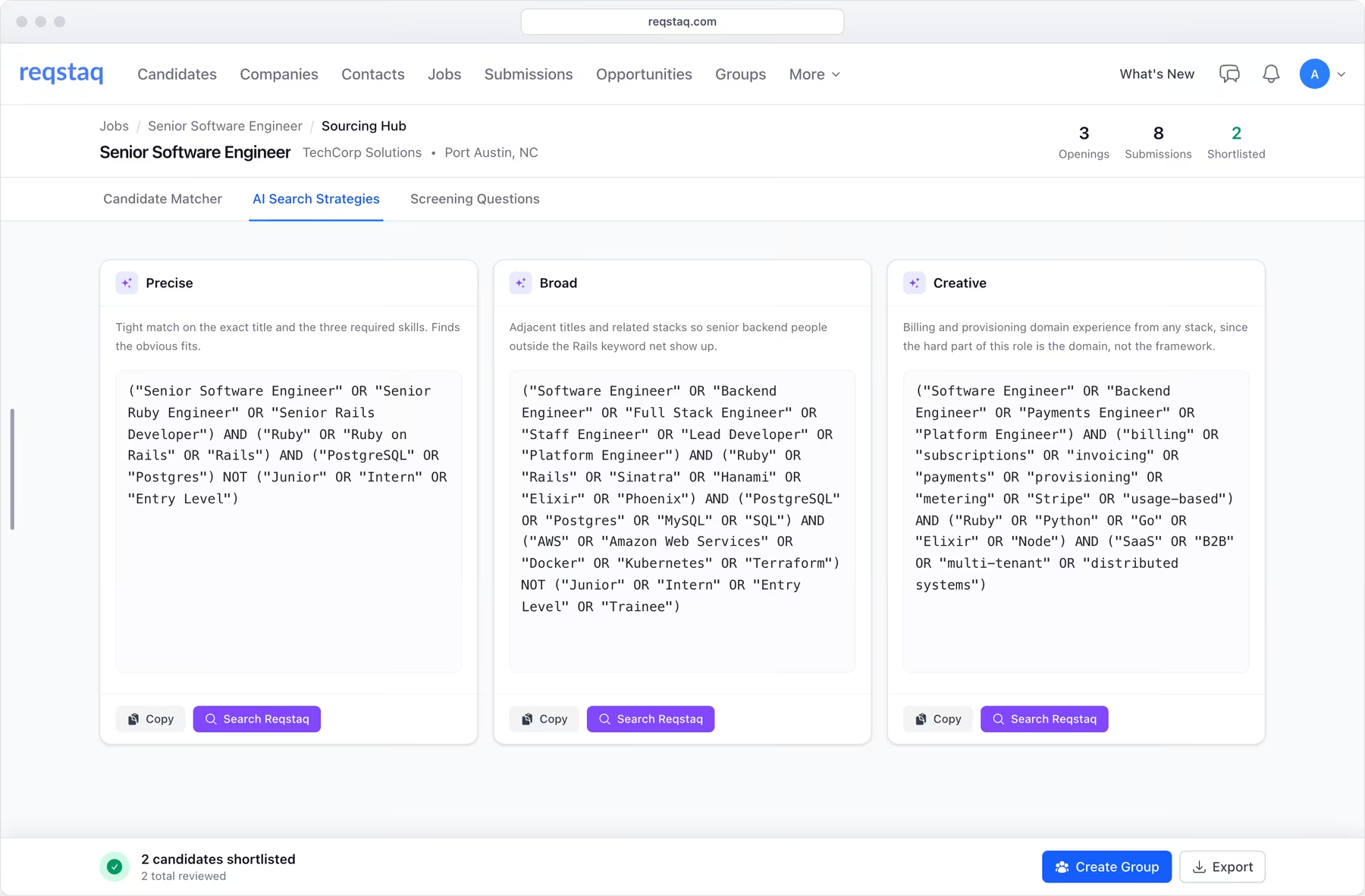
Search strategies
Boolean strings and a phone screen, written from the job order.
Precise, broad and creative searches for LinkedIn and Indeed, alternate titles candidates actually use on their resumes, and must-ask screening questions for the first call.
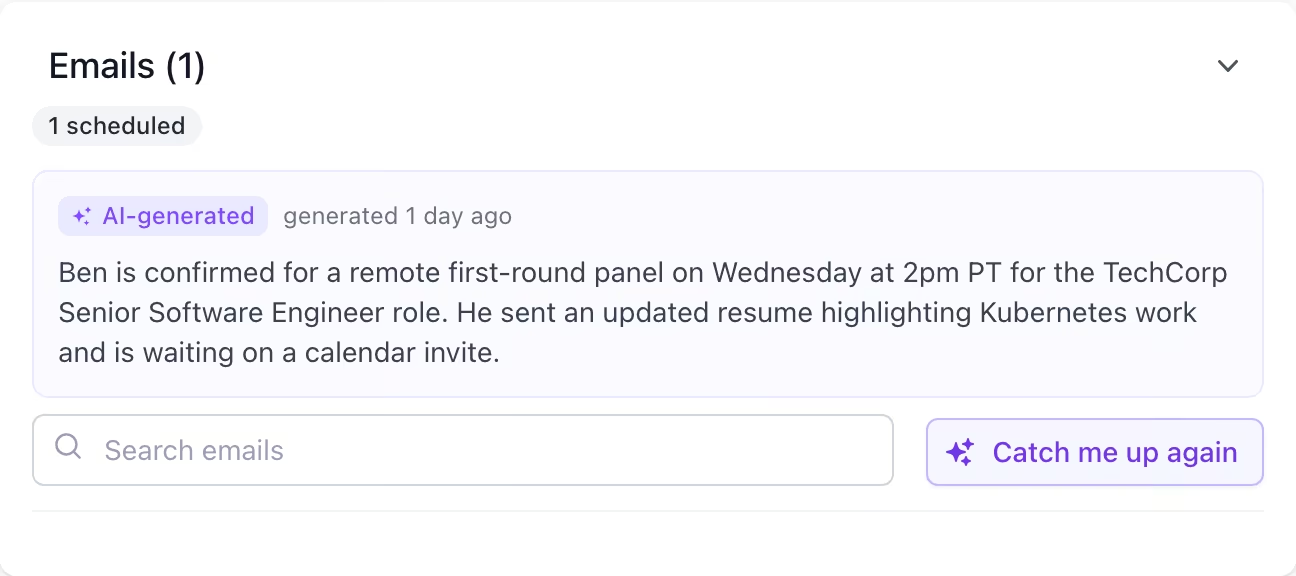
Catch me up
Read the whole thread in one paragraph.
On any candidate or contact, get a summary of the last ten conversations, a first draft of your reply, and a flag when someone declines or has left the company.
Fill the job from the database you already own.
Open the Sourcing Hub on any job for a ranked list of your own candidates by skills, title, experience and distance. Mark criteria required or preferred, read a fit analysis on each, and shortlist to a group.
Boolean strings and a phone screen, written from the job order.
Precise, broad and creative searches for LinkedIn and Indeed, alternate titles candidates actually use on their resumes, and must-ask screening questions for the first call.
Read the whole thread in one paragraph.
On any candidate or contact, get a summary of the last ten conversations, a first draft of your reply, and a flag when someone declines or has left the company.
Resumes and job orders parse on upload, by email to your intake address, from the Chrome companion, or through Zapier.
Reports that answer the questions owners ask.
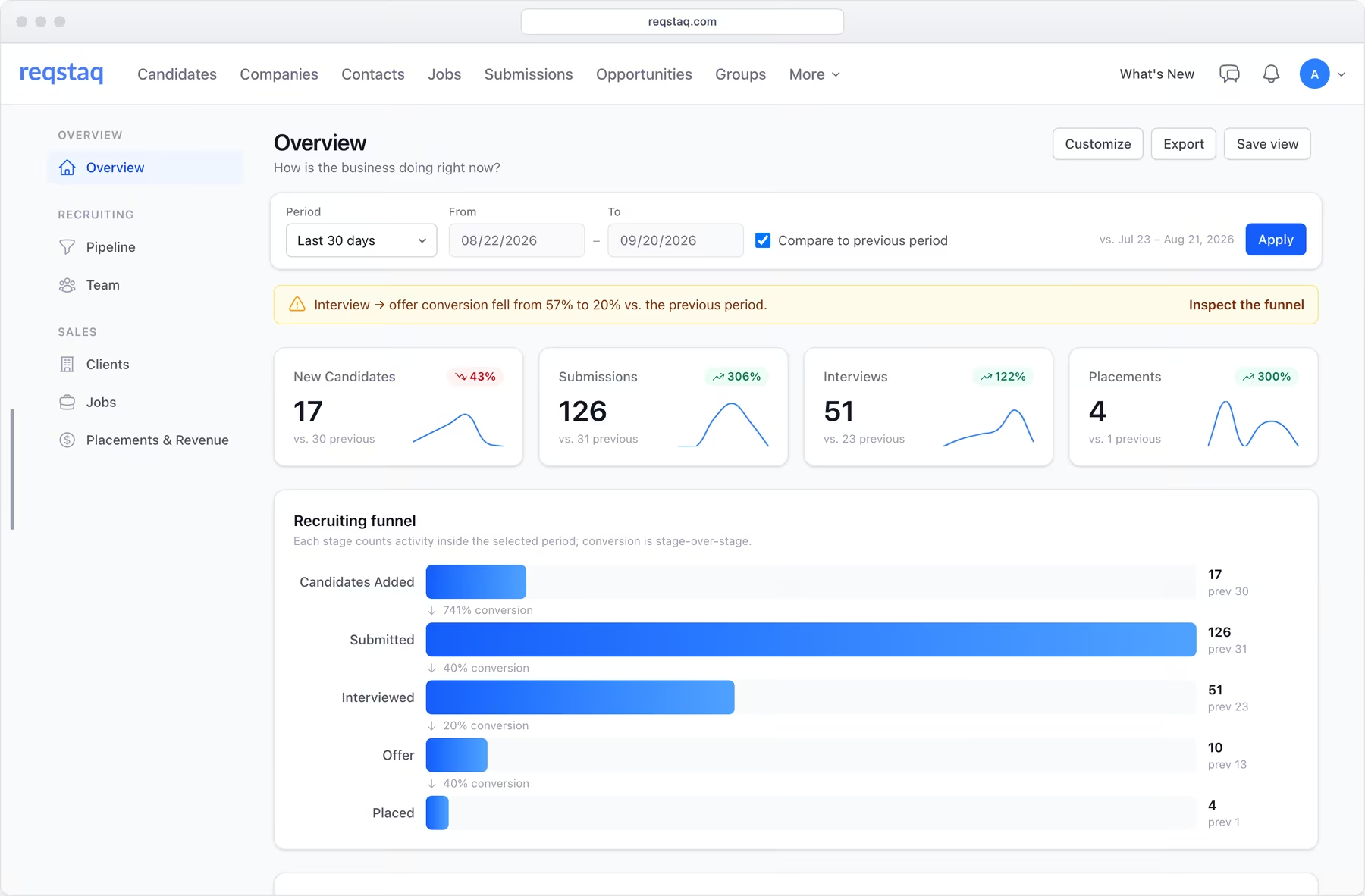
Six reports, each built around one question. Filter by teammate, client or job, compare with the previous period, save the view, export to CSV, and click any number to see the records behind it.
- Overview
- How is the business doing right now?
- Pipeline
- Is our funnel healthy, and where does it leak?
- Team
- Who's performing, and is effort turning into outcomes?
- Clients
- Which accounts are healthy, and which are at risk?
- Jobs
- Is this req on track to fill?
- Placements & Revenue
- What did we close, what's at risk, and what's the money?
Goals every recruiter and salesperson can see.
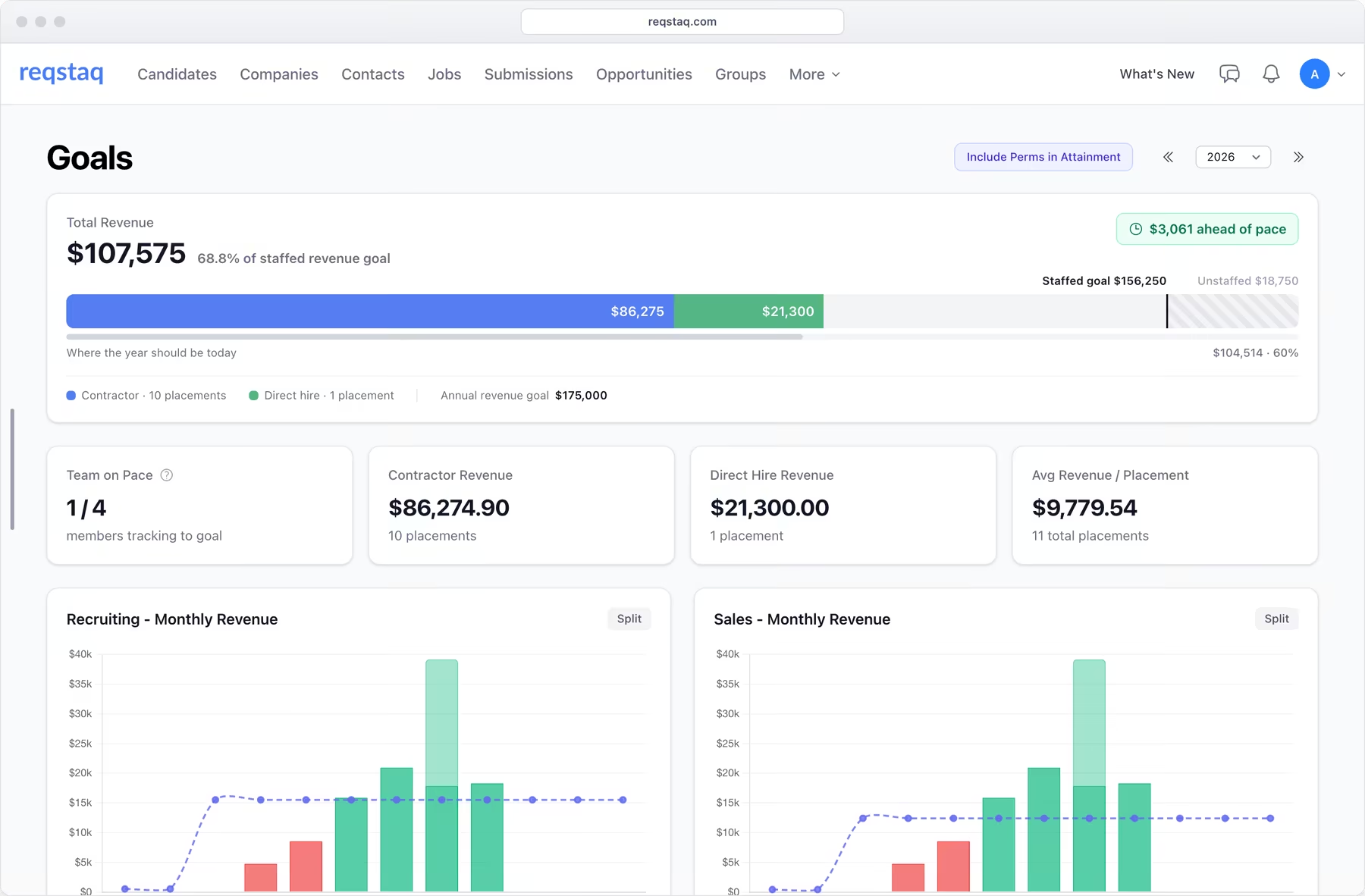
Set the year's revenue target for the firm and for each person. The Goals dashboard shows monthly revenue against target, attainment per recruiter and per salesperson, and what each placement is worth to the people who made it.
- Recruiting and sales tracked separately, with contractor and direct-hire revenue side by side.
- Commission payouts computed from your own structures, so recruiters see their earnings as they go.
- The same numbers on every recruiter's dashboard, updated as placements start and hours come in.
And that's just the beginning.
The parts of Reqstaq that make the rest of your week shorter.
-
Resume & job order parsing
Upload, email to your intake address, forward from Gmail with the Chrome companion, or send through Zapier. Skills, history and requirements are filled in.
-
Search & filters
Keyword and boolean search, column filters, date ranges and custom fields, combined however you need. Column layouts are saved per person.
-
Group reviews
Flip through a group one record at a time, remove candidates as you go, and pick up exactly where you left off days later.
-
Commissions
Tiered recruiting and sales commissions, supervisory overrides, and one-off bonuses per job or client. Recruiters see their own earnings in real time.
-
Revenue formulas
Define how gross margin is calculated for contractors and direct hires, including burden and overtime, with a drag-and-drop builder.
-
Duplicate detection
Candidates matched by name or phone number, companies and contacts by name, with a merge that lets you pick which fields to keep.
-
Public application forms
A hosted or embedded apply page for every job. Applicants are parsed into candidates, grouped, and the job owner is notified.
-
Zapier & API
Push resumes in from any tool you already use. A token-based REST API with public documentation for everything else.
-
Custom fields
Track anything you need on candidates, jobs, submissions, contractors, invoices and more. Filterable and editable in bulk.
-
Granular permissions
Per role, decide what each person can view, create, edit and delete on every record type, which screens they see, what they can do with email and notes, and who sees compensation.
-
iOS app
Coming soonYour candidates, jobs, notes and reports in a native app, with search and notifications on your phone.
-
Backed up and locked down
Verified nightly backups, 14-day point-in-time recovery, encrypted backup storage, two-factor authentication, and a Support Center inside the app.
Simple pricing, no surprises.
One plan with every feature — just $119 per user / month. No tiers, no add-ons, no contracts.
Everything included
$119/user/mo
Billed monthly per active user. Contractors use the portal at no charge.
- Candidates, jobs, submissions & placements
- Search, filters & group reviews
- Contractor Portal with timesheets & pay statements
- Client invoicing
- Email on every record, sent from your mailbox
- Templates, follow-ups & campaigns
- AI Sourcing Hub
- Resume & job order parsing
- Insights reports & goals
- Commissions & revenue formulas
- Sales pipeline & org charts
- Custom fields on every record
- Granular permissions
- Zapier & API
14-day free trial · No credit card required · Cancel anytime
Switching from Bullhorn? See what the price actually includes

Frequently asked questions
Can't find what you're looking for? Reach out and we'll get back to you right away.
-
-
What types of staffing firms is Reqstaq built for?
Reqstaq is built for staffing and recruiting agencies — whether you focus on contractor placements, direct hires, or both. From boutique firms to growing agencies, Reqstaq scales with your team.
-
How does Reqstaq compare to Bullhorn?
Reqstaq puts every feature, including AI, analytics, timesheets and client invoicing, on one plan billed only for active users, month to month. Bullhorn splits those features across four tiers and separately quoted products.
See the full comparison -
Will you help me migrate my data from another platform?
Absolutely. We'll work with you to import your existing candidates, companies, contacts, and jobs from spreadsheets or your old platform — at no extra charge. Our goal is to get you up and running as quickly as possible.
-
How does email get onto records? Do we need a plugin?
Your IT admin adds one rule in Google Workspace or Microsoft 365 — about ten minutes of their time. From then on, mail between your team and anyone in your database is copied to their record. Nothing to install and no BCC address. Reqstaq never reads your inbox; sending uses a send-only permission on your own account.
-
-
-
Does Reqstaq pay contractors?
No. Reqstaq produces the pay statement with the contractor's payout details on it and locks the hours behind it. You pay through your bank or Payoneer the same way you do today.
-
Can we invoice clients from Reqstaq?
Yes. Pick the client, the month and the contractors, and the invoice builds itself at bill rate with one line per rate period. Download the PDF, then mark it sent and paid.
-
Is there a limit on candidates or records?
No. Every account includes unlimited candidates, companies, contacts, jobs, submissions, and opportunities. You only pay per user.
-
Do you offer a free trial?
Yes. Start a free 14-day trial right from our homepage — no credit card required. You get full access to every feature so you can see Reqstaq in action with your own workflows.
-
Do contractors need a paid seat?
No. Contractors use the Contractor Portal free of charge to submit timesheets, download pay statements and message your team. You only pay for your own team's active users.
-
-
-
What kind of support do you offer?
Every customer gets direct access to our team. Guides live inside the app in the Support Center, and tickets are answered by the people who build Reqstaq — no ticket queues or chatbots.
-
Are there any contracts or lock-in periods?
No. Reqstaq is month-to-month with no long-term contracts. You can cancel anytime — no penalties, no hassle.
-
Can I customize the platform for my workflow?
Absolutely. Custom fields let you track anything you need on candidates, jobs, submissions, contractors, invoices and more. You can also define your own revenue formulas, commission structures, submission statuses and email templates.
-
How is my data secured?
All data is isolated per account with two-factor authentication for every user. Backups are taken nightly and verified, with point-in-time recovery for the last 14 days and encrypted backup storage. AI features are off by default and switched on by your admin.
-
Ready to get started?
Tell us about your team and we'll get back to you within one business day.